
When you think about customer feedback surveys, the first thing that comes to mind is often a survey form builder. Tools like Tally have made it easier to build a survey form from scratch and collect responses for the same. But if you’re building a SaaS product or scaling a value based product , you already know the hard truth that collecting feedback is only step one. The real challenge is turning that feedback into actionable insights that influence your product roadmap, changelog, and customer communication.
That's the solution Forms & Surveys by FeatureOS has to offer. While Tally shines as a lightweight form builder, FeatureOS is built as a feedback-to-roadmap ecosystem for product teams who don't want feedback to disappear into spreadsheets and juggle them through various other tools. If you are evaluating other general-purpose builders too, our guide on alternatives to Google Forms for SaaS covers how purpose-built tools compare. In this article, we’ll break down FeatureOS vs Tally in detail, feature by feature and show why connecting your forms to a roadmap isn’t just convenient, it changes how a scaling SaaS team works.
Before We Begin: Who Really Needs FeatureOS?#
Before comparing FeatureOS and Tally, it’s important to understand who actually benefits from this comparison. Both tools serve different audiences and knowing which side you fall on will make your decision clearer. While Tally Forms are built to serve broader use cases, FeatureOS is very user specific and is designed specifically to scale product teams but can be used for various other use cases for such organizations, as well.
a. For Product Managers Who Want Clarity#
If you’re a product manager constantly juggling customer feedback, feature requests, and internal priorities, you’ve probably seen how quickly insights get buried in spreadsheets or Notion pages. FeatureOS is built specifically for you. It helps you not just collect responses through online forms, but connect them directly to your product roadmap, which you share with your users or your internal team members.
Related : The Product Manager’s Guide to using FeatureOS Forms
b. For SaaS Founders & Startups#
If you’re a SaaS founder or part of a scaling product team, you know how fast feedback piles up when you start to grow. Tally gives you a way to collect it but what happens next? You spend hours manually tagging, categorizing, and forwarding responses to product or dev teams. FeatureOS helps you scale by keeping your entire feedback ecosystem in one single workspace where the cycle goes like : Feedback → Roadmap → Changelog → Knowledge Base cycle.
c. For Customer Success & Support Teams#
If you handle customer relationships, you know the pain of hearing the same request over and over without visibility into whether it’s being acted on. With FeatureOS, every form submission can be tied to a roadmap item , helping you track status and automatically update customers when their request goes live.
| Role | Problem | Why FeatureOS Fits |
|---|---|---|
| Product Managers | Feedback scattered across tools | Connects responses directly to roadmap items |
| SaaS Founders | Feedback loop broken post-collection | Centralized insights with roadmap & changelog link |
| Customer Success Teams | No way to track if requests are acted on | See request status and auto-update customers |
| Startups | Disjointed feedback systems | All-in-one feedback and roadmap setup |
Both tools help you collect inputs from users, prospects, or teammates, but they serve different audiences:
- Tally: Geared toward creators, marketers, and businesses that need a simple way to create forms.
- FeatureOS: Geared toward SaaS and product-led companies who don’t just want to collect feedback - they want to act on it.
This difference is subtle at first, but becomes massive as your product grows. Tally is great if you want to ask questions. FeatureOS is great if you want to build better products with those answers.
Related : Turn Every Customer Survey Responses Into Feedback Insight
1. Form-Building Experience#
Tally#
Tally uses a Notion-style block editor. You can type commands, insert blocks, and create forms quickly without touching code. It’s flexible and simple, perfect for anyone who wants forms that look good out of the box.
- Strengths: Modern UI, markdown support, templates, easy to learn.
- Weaknesses: Limited formats (mostly linear/list), and responses stop at the form. There is no native link from an answer to a roadmap item.
FeatureOS#
FeatureOS takes a drag-and-drop approach, with support for list and wizard formats. This means you can design both simple linear forms and multi-step wizards that guide users through questions.
- Strengths: Advanced conditional logic (multiple rules can stack within a single flow), native branding options, and multi-format support.
- Weaknesses: No AI prompt-based builder (yet).
An interactive walkthrough of building a form in FeatureOS, from blank canvas to a multi-step wizard.
2. Conditional Formatting#
Tally#
Tally does support conditional logic, and it is included on the free plan alongside calculations (see Tally's conditional logic documentation). You can branch a form on an answer without paying anything, which is genuinely good.
Where Tally stops is after the response lands. Reading results means sorting and filtering a response table, so digging into a large or open-ended response set usually ends with an export into a spreadsheet.
FeatureOS#
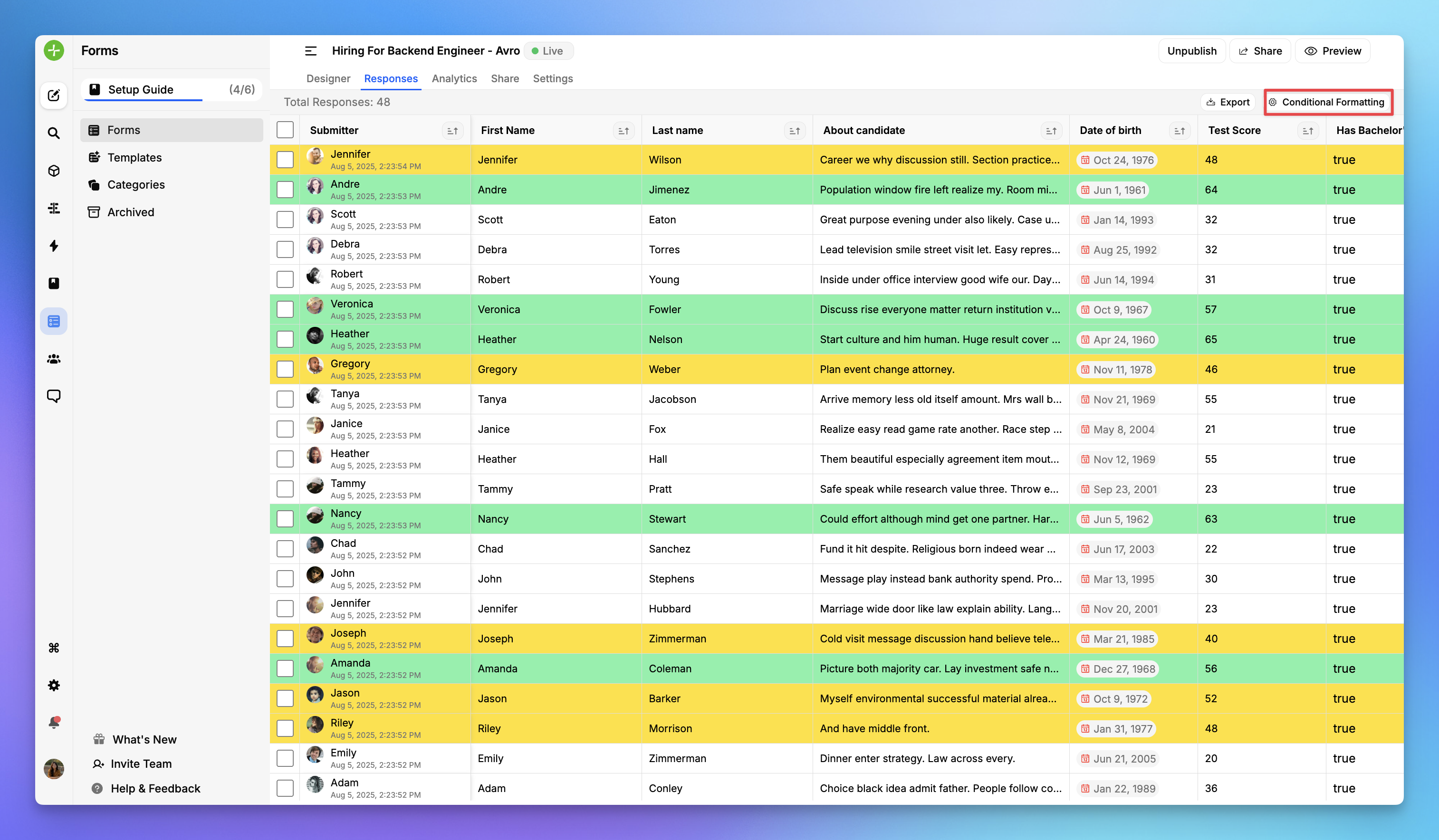
FeatureOS supports complex conditional flows in the form, and it also applies conditional formatting to the responses themselves. You can set up multiple conditions under a single rule and highlight the responses that matter in a color of your choice, so a large response set stays readable inside the product instead of inside Excel. In case of multiple rules matching the same field, the last applied rule will be used for highlighting.
Example:
- A SaaS team can ask, “Do you use Slack or Microsoft Teams?”
- If the user selects Slack, the form continues into deeper Slack-related questions.
- If they select Teams, a different set of questions appear.
3. Feedback Workflow After Collection#
This is where the biggest gap between Tally and FeatureOS emerges. Tally can forward responses to other tools through integrations, but it has no roadmap of its own, so the roadmap always lives somewhere else.
Tally#
What makes it tougher is that Tally has no built-in connection between feedback and your product roadmap. There’s no way to see which requests tie to existing features, which ones are trending, or which customers are asking for them.
FeatureOS#
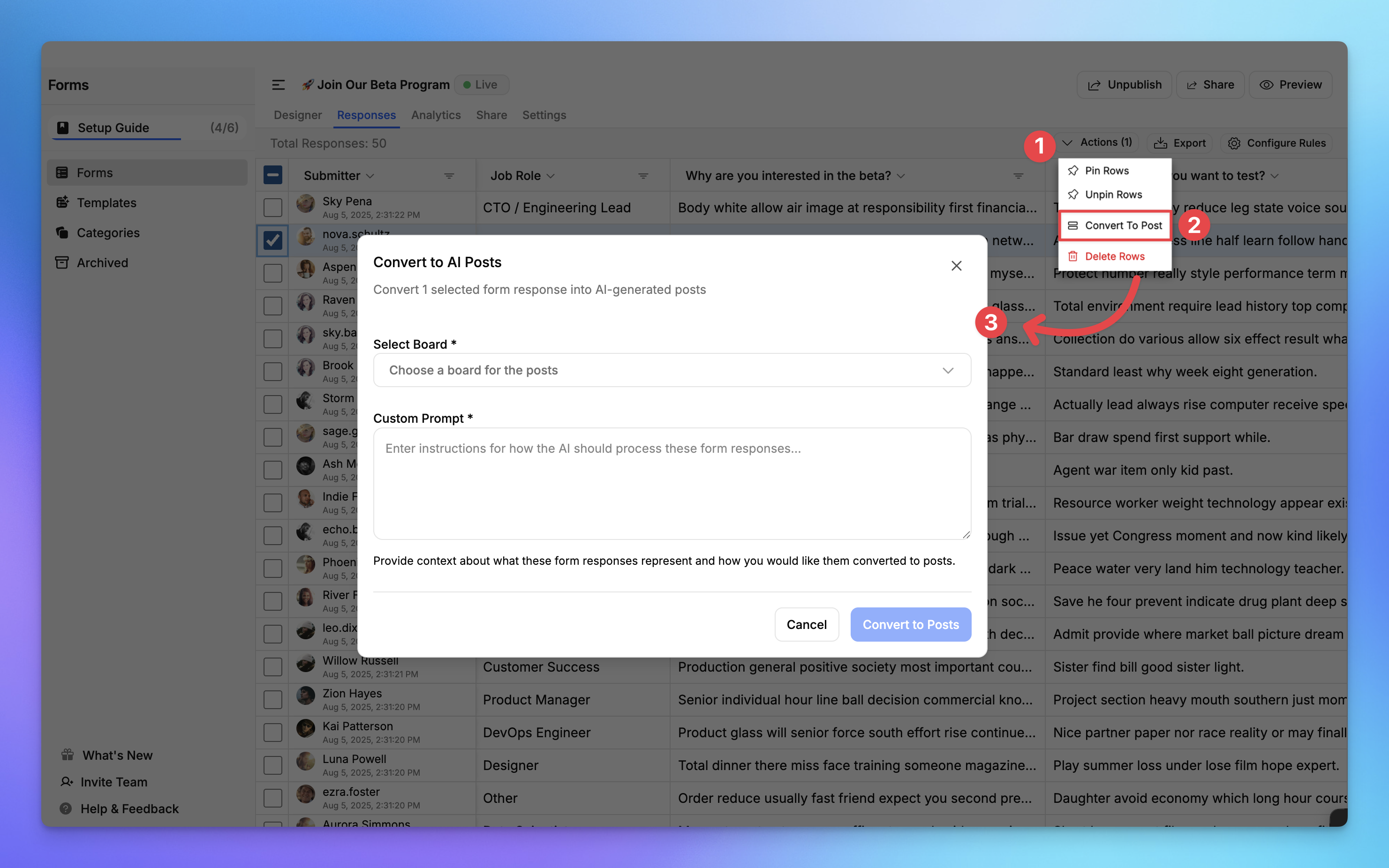
FeatureOS was built with a completely different philosophy, that feedback isn’t valuable until it drives real product outcomes. Here’s what happens once responses start flowing in:
- Feedback is automatically organized and linked to roadmap items.
- You can tag form responses to existing feature requests or new ideas.
- This gives instant visibility into which areas customers care most about like integrations, UX issues, pricing, onboarding, etc.
- You can cluster and prioritize feedback effortlessly.
- Instead of sifting through spreadsheets, FeatureOS automatically groups similar inputs.
- You’ll quickly see trends like “40% of users requested a Slack integration” or “most feedback relates to billing confusion.”
- Roadmap items evolve in real time.
- Product managers can view which feedback entries link to each roadmap card.
- This context helps prioritize based on actual demand, not assumptions.
- Close the loop automatically via changelogs.
- Once a feature is shipped, FeatureOS lets you instantly notify users who requested it, directly through in-app changelogs or public updates.
- This transforms a static feedback form into an ongoing conversation between your product and your users.
With this loop, FeatureOS replaces fragmented manual work (Google Sheets → Notion → Jira → Slack) with an integrated feedback engine that feeds directly into your roadmap.
4. Analytics and Insights#
Collecting responses is easy. But if you’ve ever tried to manually analyze open-ended answers or figure out what 200 customers really meant, you know how painful that process can be. You scroll through endless responses, try to group them mentally, and then end up guessing what’s most important. That’s where FeatureOS analytics completely change the experience.
Every question(field) inside your form, whether it’s a dropdown, checkbox, rating scale, or an open-ended field, turns into its own layer of insight. You don’t need to dig through text; FeatureOS automatically organizes, quantifies, and visualizes responses so you can instantly see what your users care about most.
Let’s understand with an example:
Question asked to user: “What improvements would you like to see next?”#
Normally, this kind of open-ended question would leave you with a hundred different sentences to read through. Some users mention UI polish, others want integrations, some say “speed,” and a few might request new modules.
With FeatureOS, those answers are automatically clustered and categorized into clear, visual insights, like this:
| Improvement Theme | Percentage of Mentions |
|---|---|
| Integrations | 38% |
| UI/UX Enhancements | 27% |
| Analytics | 19% |
| Forms Improvements | 16% |
You don’t need to read a single response. In seconds, you know what your user base collectively wants. For SaaS teams making roadmap decisions, this is gold. Instead of gut feelings or messy spreadsheets, you see quantitative signals of what customers want.
Final Verdict#
Tally is a great tool if all you need is a beautiful, no-code form builder. It’s affordable, intuitive, and loved by creators. But if you’re a scaling SaaS team or product company, you need more than forms. You need a system where feedback feeds your roadmap, insights guide prioritization, and customers stay engaged throughout the journey. That’s why FeatureOS is the best Tally alternative for product teams.
TL;DR Comparison Table#
| Feature | Tally | FeatureOS |
|---|---|---|
| Form Builder | Markdown-style | Drag-and-drop |
| Conditional Logic | Included on every plan | Advanced, multi-rule and conditions |
| Feedback Workflow | Ends with raw data | Links to roadmap & changelog |
| Analytics | Minimal | Deep insights + clustering |
| Survey Format | List Only | List & Wizard |
| Integrations | Notion, Zapier, Airtable | Slack, Jira, Linear, Intercom |
| Sharing Options | Embed and Link Sharing | Link, Embed, Widget, Email with Segmentation |
| AI Summary & Sentiment Analysis | No | Yes |
| Best For | Creators, freelancers | SaaS, scaling product teams |
| Pricing (as of August 2026) | Free, Pro $24/mo, Business $74/mo (tally.so/pricing) | Starter $60/mo, Growth $120/mo, Business $250/mo (pricing) |
Sounds like something your team might be interested in? Request a Product Demo or start your free trial of FeatureOS with no gated features, or simply take a virtual tour below:
An interactive tour of FeatureOS, covering forms, feedback boards, roadmap, and changelog.